
PHWIN Deposit – Guide to Fast and Secure Transactions
PHWIN Deposit procedures provide players with a swift, secure, and reliable way to fund their online gaming accounts using local e-wallets, online banking, and cryptocurrency options. PHWIN gaming enthusiasts looking to fund their accounts can complete a transfer within just 2 to 5 minutes using various payment channels supported on the platform.
Supported PHWIN Deposit Methods and Limits
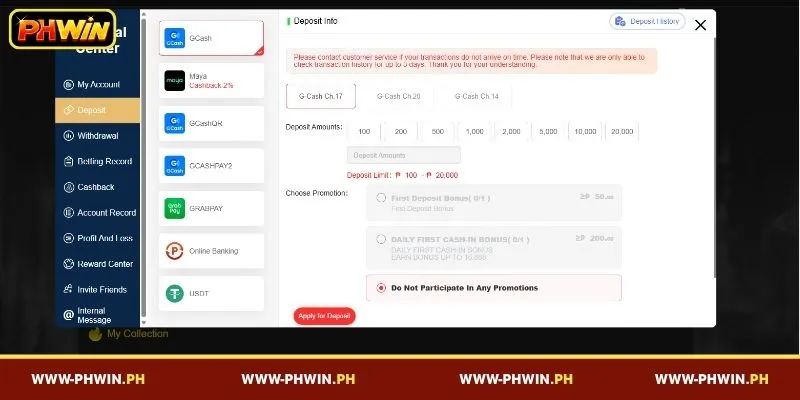
To ensure convenience for all players in the Philippines, the system supports multiple payment channels with flexible transaction boundaries. The table below outlines the core limits, processing times, and special offers associated with each funding method:
| Payment Method | Deposit Channels | Min Limit (₱) | Max Limit (₱) | Processing Time | Special Notes / Offers |
| GCash | Ch.20, Ch.14, Ch.17 | ₱100 | ₱50,000 | Instant – 3 Mins | Standard e-wallet funding |
| Maya | PayMaya Ch.17, Ch.32, Ch.16 | ₱50 | ₱50,000 | Instant – 3 Mins | Includes 2% Cashback promo |
| GCashQR | QR.19, QR.9, QR.14 | ₱100 | ₱50,000 | Instant – 3 Mins | Scan via QR code |
| GCASHPAY2 | Gcash-MB QR.32, QR.17 | ₱300 | ₱50,000 | Instant – 3 Mins | Supports all e-wallets & mobile banking |
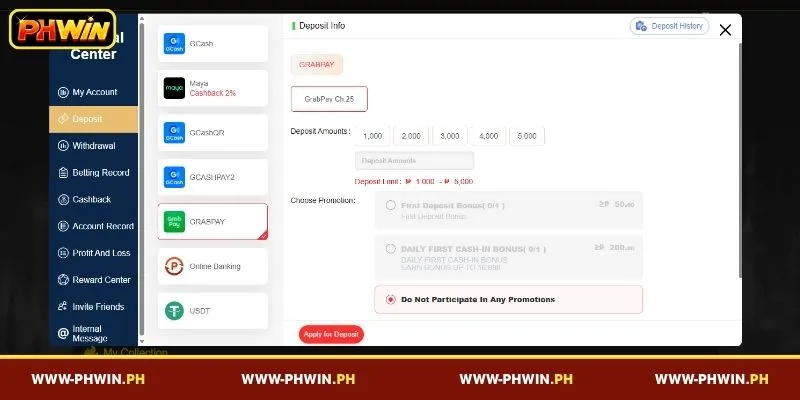
| GrabPay | GrabPay Ch.25 | ₱1,000 | ₱5,000 | Instant – 5 Mins | Preset amounts: ₱1k to ₱5k |
| Online Banking | Bank Ch.25 | ₱1,000 | ₱50,000 | 3 – 5 Mins | Preset amounts up to ₱50,000 |
| USDT | ERC20 | ₱300 (5.45 USDT) | ₱1,000,000 (18,181.81 USDT) | 5 – 10 Mins | Fixed Exchange Rate: 1 USDT = ₱55.00 |
Every PHWIN Deposit option is designed to match different player budgets, starting from as low as ₱50 via Maya up to high-tier crypto transactions.
Step-by-Step Guide to PHWIN Deposits
Completing a PHWIN Deposit requires only a few clicks through your member account dashboard. Follow these straightforward instructions to submit your payment quickly and start playing without delays:
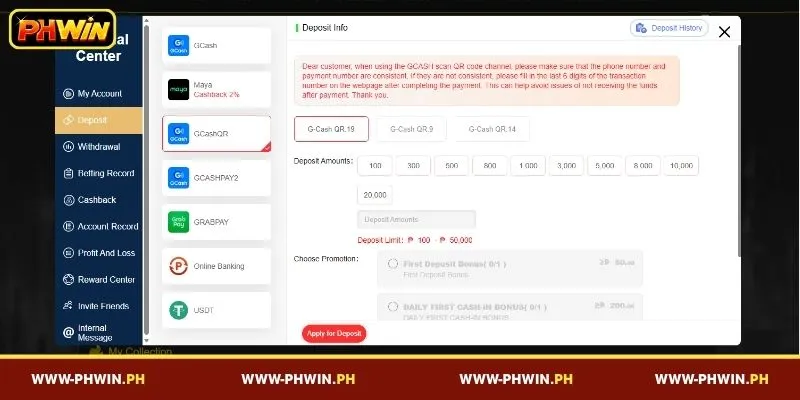
- Step 1:Log in to your gaming account and click the blue “Deposit” button located at the top navigation bar to open the payment portal.
- Step 2:Select your preferred payment channel from the left sidebar (such as GCash, Maya, GrabPay, Online Banking, or USDT).
- Step 3:Choose your specific channel variant (e.g., PayMaya Ch.17 or G-Cash Ch.20) and pick a preset amount or manually enter your desired figure within the channel’s designated limits.
- Step 4:Select an available promotion (such as the First Deposit Bonus requiring a minimum ₱50 or the Daily First Cash-in Bonus requiring a minimum ₱200), or check “Do Not Participate In Any Promotions”.
- Step 5:Click the red “Apply for Deposit” button at the bottom of the form to generate your transaction gateway.
- Step 6:Authorize the payment through your chosen e-wallet app, mobile banking portal, or crypto wallet to complete the transfer.
Once authorized, your cash-in request will be processed immediately by the automated system, crediting funds straight to your main wallet balance.
Important Points to Keep in Mind When Making a PHWIN Deposit
To prevent potential delays or balance mismatches during your PHWIN Deposit, make sure to keep the following technical requirements and account rules in mind:
- Match Payment Details:When utilizing GCash QR code channels, ensure that your registered phone number matches your active payment account number precisely.
- Handle Mismatches via Transaction Numbers:If your payment phone number differs from your registered account number, manually enter the final 6 digits of your transaction reference number on the webpage right after finishing your transfer.
- Binance Network Fees:For users sending USDT via Binance, remember to add an additional 1 USDT to your transfer total to cover mandatory network transaction fees.
- Fixed Crypto Rates:Crypto conversions utilize a fixed system exchange rate where 1 USDT equals ₱55.00, ensuring consistent deposit values regardless of market fluctuations.
- Support Verification Window:Keep in mind that customer support can only retrieve, verify, and check transaction history logs for up to 3 days from the time of transfer.
Adhering closely to these key rules ensures every PHWIN Deposit you submit processes smoothly without requiring manual intervention.
Common Issues and How to Resolve Them During PHWIN Deposits
While most digital transactions are processed within minutes, temporary network disruptions or input mistakes can occasionally cause delays during a PHWIN Deposit. Understanding the common root causes and knowing the exact steps to take will help you quickly resolve any deposit issues and get back to playing without unnecessary stress.
PHWIN Deposit Not Credited
If your PHWIN Deposit balance does not reflect in your game account after 5 minutes, verify that the funds were successfully deducted from your GCash, Maya, or bank account. Take a screenshot of the payment receipt showing the reference number, date, and time, then send it directly to online customer service.
Providing clear proof enables the support team to quickly locate your transaction in the system and credit the funds to your account manually without prolonged delays.
Deposit Failed or Rejected
A PHWIN Deposit failure typically occurs when the entered amount falls outside the mandatory min-max limits, such as entering below ₱100 for GCash or over ₱5,000 for GrabPay.
Double-check that your chosen amount strictly matches the allowed channel boundaries before clicking the application button again. Additionally, ensure that your payment source has sufficient funds and that your account details are correctly entered to avoid instant rejection by the payment gateway.
Deposit Pending for Too Long
When a PHWIN Deposit status remains pending for over 15 minutes, it usually indicates a temporary gateway congestion on the payment provider’s end.
Avoid submitting duplicate payment requests, as this can lead to confused billing or multiple unwanted charges; instead, contact customer support immediately so an agent can manually verify your payment logs before the 3-day history limit expires.
Conclusion
Mastering the PHWIN Deposit process allows players to fund their accounts effortlessly using local e-wallets, online banks, or crypto channels with maximum speed and convenience. By choosing the right method, checking transaction limits, and following correct transfer guidelines, you can enjoy uninterrupted entertainment on PHWIN anytime.